Pera's Swap Widget puts a working trade box inside other Algorand apps
Pera Wallet offers the routing engine behind its own swaps as an embeddable widget and an API, so a visitor connects a wallet, reads a rate and signs without leaving the host app. A demo site shows four ways to wire it, and quotes can be fetched without holding funds.
A trade box that stays inside the app
The Pera Swap Widget is a trade box an Algorand app can set inside its own screens: a visitor connects a wallet, picks two assets, reads a rate and signs, and never leaves the page. Behind it sits P.E.R.A., the routing engine Pera Wallet1 uses for swaps in its own app, now offered to outside developers as a package they can embed whole or call as an API while drawing their own interface.
Two ways to take it. The quicker is an iframe pointed at Pera's hosted widget2, configured through its URL: network, theme, the asset going in (ALGO unless told otherwise) and the one coming out (USDC by default). The fuller way is to build your own swap screen on the swap API; the package's README3 puts the choice as embedding the widget 'in an iframe, optionally signing transactions with your own wallet4', or building 'your own swap UI on top of the Pera Swap API (quotes, transactions, assets)'.
Signing is the part that decides where the wallet lives. With parent signing switched on, the widget opens no wallet connection of its own and asks the host page to sign instead; the README says the Pera API has already signed the transactions that are not from the user's account, so the host page returns only its own signatures.
Routing, in this arrangement, becomes a function an app calls rather than a place a user visits. The app never becomes an exchange and never holds the asset being traded; it needs only to be the place the user already is. The shape repeats wherever an on-chain service is mostly routing, and it makes the builder on the other side the customer.
Trying it, and what it asks of a user
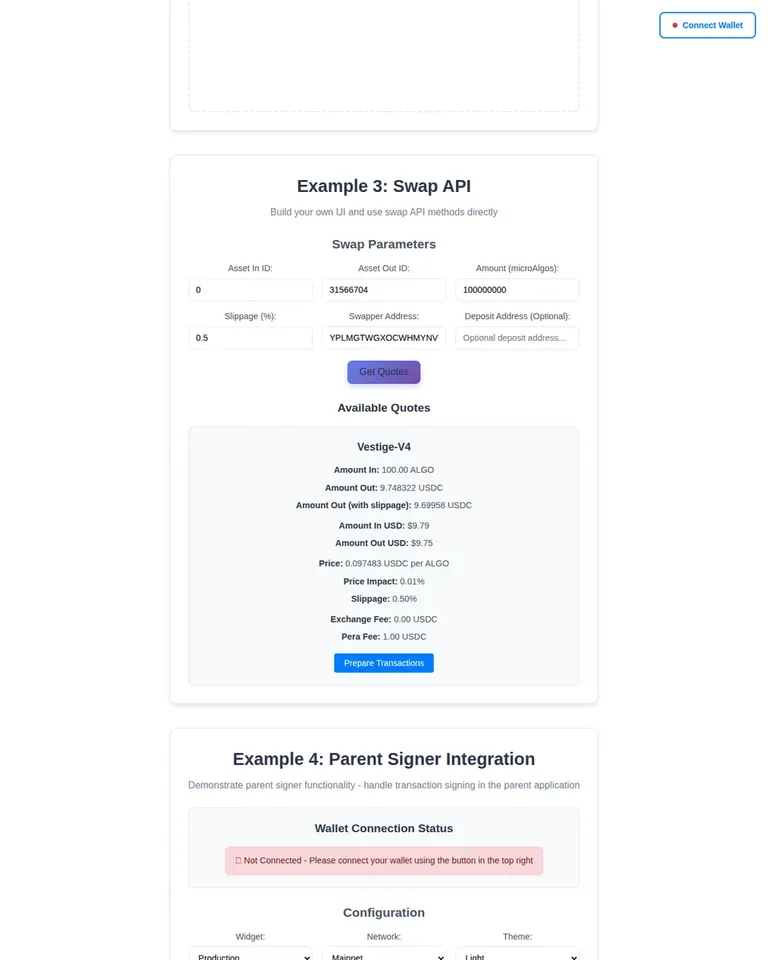
Developers start at a demo site5 that walks four wirings: generate a widget URL, build the iframe in code, call the swap API directly, or hand signing to the parent page. Quotes can be requested without holding anything, but preparing a trade needs a funded account: asking for transactions against an address with no ALGO returned 'Algo balance is insufficient' and produced nothing.
An ordinary user never installs anything. They meet the box inside whichever app embedded it, connect a wallet and trade. If the token they are buying is new to their account, the wallet prompts them to opt in as part of the swap.
What a swap costs, and what the fee line says
Pera's help centre6 says the wallet charges a fee of up to 1%7 on swaps, calculated on the value of the 'from' asset and shown as Pera Fee on the quote screen before signing. The same page puts the venue's own pool fee at typically 0.25–0.3%8, which it says goes to liquidity providers; that rate is a pool's convention rather than anything the network sets, and it differs by venue. Algorand's flat minimum is 0.001 ALGO per transaction; Pera's page puts the network fee at under $0.019 and notes it applies whether the swap succeeds or fails, and one swap can be several transactions in a group.
Which asset the fee line is counted in changes what it means. The widget's own review screen prints Pera Fee with the unit ALGO, dividing the raw amount by a million to get there.
The demo's panel labels the same number differently. Its quotes on 5 November put a Pera Fee of 0.01 on a 1 ALGO swap returning 0.097522 USDC, and a Pera Fee of 1.00 on a 100 ALGO swap returning 9.748322 USDC, both labelled USDC. The example code behind that panel formats the fee with the output asset's decimals and unit name, which is where the USDC label comes from. The number is 1% of what the user put in either way — 0.01 of 1 ALGO, 1.00 of 100 ALGO — while read as USDC it would be about a tenth of the trade, outside the up-to-1% Pera's page describes. So the widget's ALGO label is the one that matches the published fee, and the demo's USDC label reads as a formatting slip in an example; what a hand-built interface prints is up to whoever builds it.
The venues behind a rate
Pera's help centre10 names four platforms behind the aggregator: Vestige, Tinyman, Folks Finance and Deflex (TxnLabs). The shipped package defines three provider names a caller can request — tinyman, tinyman-swap-router and vestige-v4 — and no value for Folks Finance or Deflex. A builder reading the product description expects four venues; the code accepts three.
Who builds it, and how it is going
Pera Wallet is a product of Pera Wallet, Lda, and describes itself as non-custodial and self-hosted: the keys and the assets stay on the user's device, and the company says it does not store or recover recovery phrases. It began as the official Algorand Wallet and was rebranded in February 2022, shipped a full 7.011 rebuild of its mobile apps in August (that story), and in January replaced its older on-ramp with a wallet-native funding flow, Pera Fund.
The developer API was announced on Pera's blog12 on 9 October 2025, describing P.E.R.A. as the Pera Ecosystem Routing Aggregator and offering the npm package and a demo app. The package13 had been on npm since 14 August 2025; 1.0.0-beta.514, the current version, was published on 28 October 2026, roughly a year after the version before it. It was downloaded 466 times15 in the thirty days to 4 November, and the repository3 shows four stars, last pushed on 2 November. Downloads count automated installs and mirrors as readily as people, so neither figure measures how many apps carry the box.
The launch post also promises integrators 'Stable fee revenue — Earn swap fees in USDC or any preferred stable asset16'. How that revenue is set, split or collected appears in none of the material published around the package: the client's only knob for it is an optional referrer URL, documented for attribution. It may be arranged server-side, or through a field the README does not show.
The alternative is Tinyman's own Swap Widget17, documented and maintained by Tinyman's core team, which routes swaps through the Tinyman Swap Router — one venue's router rather than a shopping trip across several.
What can go wrong
Pera's terms place the trade itself with someone else: they state that Pera 'does not operate, control, execute, or settle swap transactions18' and that pricing, execution and routing come solely from a third-party provider, so a fill gone wrong is a matter between the user and the venue that filled it. The fee line is separate: the widget's own charge, which Pera's help centre puts at up to 1%19 to fund development and maintenance of the wallet, applies on top of the pool's cut.
The terms also name the United States, Canada, China and Israel among places where trading ALGO may be prohibited, and reserve the right to block access by territory. Shipping the widget to users there is a decision a builder makes with that page open.
A confirmed swap is settled. If it fills at a worse rate than the screen showed, within the slippage the user allowed, the fill stands. A swap that fails still costs the fees of the transactions submitted for it — a swap can be several in one group — and the assets stay in the wallet.
The 1.0.0-beta.5 release closed a hole in how the embedded widget talks to the page around it. Before it, the changelog says, any page or frame could send a signing request, trigger a wallet prompt and receive the signed transactions. The controller now accepts messages only from Pera's widget origin and ignores the rest with a one-time console warning, and anyone hosting the widget elsewhere must name that origin explicitly. Older versions remain on npm, so the version a builder pins decides whether the protection is there.
The default network is the other trap, and there are two defaults. The widget page itself defaults to testnet, so a hand-written iframe that omits the network parameter puts visitors on a chain where the coins are worth nothing. The package's helpers now always send a network and default it to mainnet, so a widget built through them opens on mainnet unless told otherwise.
And Pera's own documentation hub20 does not mention any of this: it lists Pera Connect, an API for asset data, NFT parsing specs and app URL schemes, with no entry for the swap API or the widget. Discovery runs through the README, one blog post and the demo.
What a builder is deciding on, then, is a dependency: a beta released about once a year that breaks when it changes, and a routing list shorter in the code than on the page. For a reader who meets the box inside someone's app, what matters is on the screen before signing — the provider, the minimum received, the price impact, and the fee line with its unit checked.
9 figures in this story are checked.See every check
Sources
- 1Pera Wallet perawallet.app↩
- 2Pera's hosted widget swap-widget.perawallet.app↩
- 3Breaking Changes github.com↩
- 5Pera Swap Widget Examples perawallet.github.io↩
- 6Pera Wallet – Understanding Swap Fees and Slippage in Pera support.perawallet.app↩
- 10Pera Wallet – How to Swap Tokens in Pera Wallet support.perawallet.app↩
- 12Introducing the P.E.R.A. API: Seamless Swap Integration | by Joseph Cecala | Pera Wallet blog.perawallet.app↩
- 13registry.npmjs.org/@perawallet/swap registry.npmjs.org↩
- 15api.npmjs.org/downloads/point/last-month/@perawallet/swap api.npmjs.org↩
- 17Swap Widget | Tinyman Docs docs.tinyman.org↩
- 20documentation hub docs.perawallet.app↩